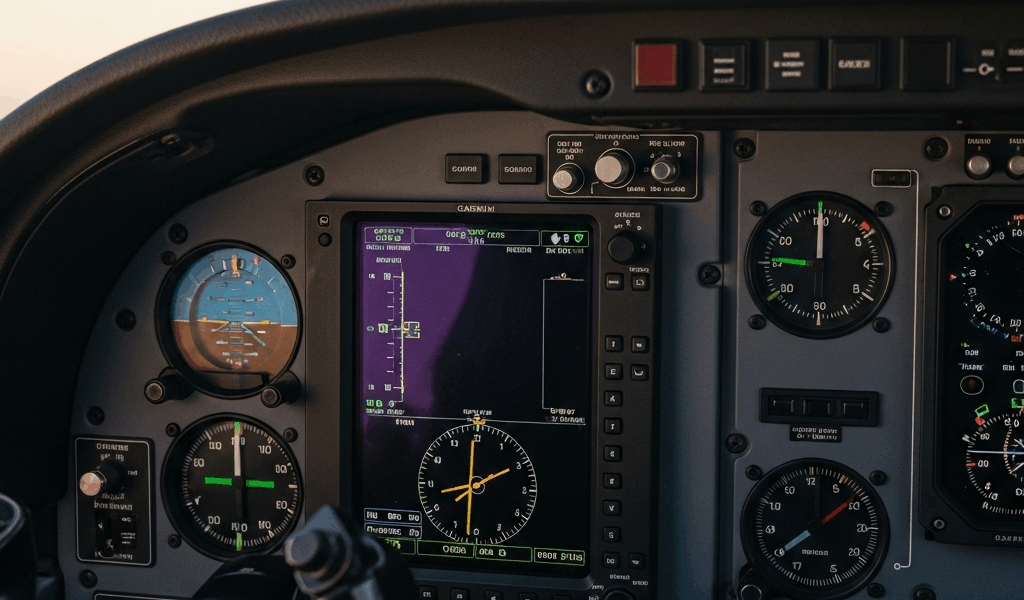
What a G1000 Freeze Actually Looks Like
G1000 freezes have gotten complicated with all the misinformation flying around.
But what is a G1000 freeze, exactly? In essence, it’s when the display system stops responding to inputs or stops updating flight data entirely. But it’s much more than that — there are actually three distinct ways it presents, and confusing one for another will send you down the wrong troubleshooting path completely.
The first is a full display freeze. Both the PFD and MFD go black or lock on whatever image was last showing. Buttons do nothing. Knobs do nothing. The whole system is just… stopped. Second is what techs call a split freeze — the PFD keeps running normally, altitude and airspeed still ticking along, but the MFD goes dark. You can still fly the plane. That distinction matters enormously. Third is unresponsive touch input. Screens look alive, data is updating, but tapping anything accomplishes nothing. The knobs and physical buttons around the bezels still work, though.
Don’t confuse any of these with simple dimming. A dim screen that responds when you crank up the brightness knob is a backlight or power issue — not a freeze. A real freeze looks like someone hit pause on a video. The clock stops. The altitude needle just hangs there. The attitude indicator locks mid-bank like a photograph.
Knowing which type you’re dealing with tells you immediately whether you’re in reversionary mode territory or something else entirely. That’s what makes proper recognition so valuable to pilots who fly these systems regularly.
The Pilot Errors That Trigger Most Lockups
I’ve talked to enough G1000 owners and shop techs to know exactly where this breaks down. Most freezes don’t come from factory defects or random component failures. They come from what we do — or don’t do — before we ever leave the ramp.
Rapid Power Cycling on the Ground
Probably should have opened with this section, honestly. This is the number-one culprit, and it’s almost always impatience. You power up the G1000, it needs roughly three minutes to fully boot. You get antsy. You kill the electrical master, wait five seconds, and bring it back up — because surely it just needs a quick restart, right? Wrong. The internal boot sequence never finished. Non-volatile memory never finalized. Each restart attempt chips away at your initialization files a little more.
I watched a pilot cycle power four times in a row on a Tuesday morning at KFDK because he was convinced the system was stuck. It wasn’t stuck. It was booting. By the fourth cycle, the database was corrupted enough to cause intermittent freezes for two weeks. Don’t make my mistake — or his.
The G1000 needs a complete, uninterrupted power-up every single time. Master on. Wait for the self-test to fully finish — not just until you see data populating, but until the entire sequence completes. Only then does anything else happen.
Database Updates Done Incorrectly
Garmin pushes database updates on a regular cycle. Terrain data, obstacle data, nav procedures — all of it needs refreshing. But the update process has hard requirements that the documentation spells out clearly, and most pilots skim right past them.
Battery voltage must stay stable for the entire load duration. Your electrical system cannot fluctuate. External power must be clean. An interrupted database load corrupts the files — not immediately, not obviously, but in ways that show up two days later as an in-flight freeze at the worst possible moment.
Doing a database update on a hot ramp with the engine running and alternator output swinging between 27 and 32 volts is a genuinely bad idea. I’m apparently sensitive to electrical system quality and a stable ground power unit works for me while the aircraft’s own alternator never does during updates. Use stable external power, or wait until you can do it right.
Skipping the Startup Self-Test Sequence
The G1000 runs a built-in self-test at every power-on. It’s verifying that the display hardware, processor, memory, and software are all talking to each other correctly. Takes two to three minutes. During that window, you’ll see partial data, test patterns, maybe some warning messages — all normal.
Pilots in a hurry see data coming up and assume the system is ready. It isn’t. Interrupting the self-test by cycling master power is essentially telling the system to skip its own health check. The next startup, it may freeze because it never confirmed its own integrity the time before. Two minutes of patience prevents a lot of problems.
Leaving the System Running on Battery Power Before Engine Start
The G1000 pulls serious current. Run it on battery alone — before the alternator is online — and you’re drawing down a 20 to 30 amp-hour battery on most trainers and light singles. Fifteen minutes of pre-start avionics use can pull voltage below the system’s minimum operating threshold. The processor starts making memory access errors. Everything looks fine on the ground. Then you get airborne, put the system under actual navigation load, and it locks up.
Engine start first. Alternator online and verified. Then bring up the glass cockpit. This order exists for a reason — follow it every time.
In-Flight Freeze Steps in the Right Order
So, without further ado, let’s dive into what you actually do when this happens in the air. Your priority is aviate, navigate, communicate — in that exact sequence. The avionics problem gets zero mental bandwidth until the airplane is stable.
- Fly the airplane on attitude and basic flight instruments. A G1000 freeze doesn’t change the fact that you have a functioning aircraft underneath you.
- Check reversionary mode. PFD frozen but MFD live, or the reverse — that’s reversionary mode, and the system is doing exactly what it was designed to do. Not a failure. A backup state.
- Attempt a soft reboot. Press and hold the Master Avionics switch — not the electrical master — for five seconds. This restarts the display without killing your other aircraft systems.
- If the soft reboot doesn’t resolve it, cross-check altitude, airspeed, and heading on your backup instruments. Know your position. Know your destination.
- Declare your situation to ATC. Tell them you have an avionics issue and need vectors or radar assistance if you’re in IMC. Don’t try to pretend everything is normal — it isn’t.
- Plan to land at the nearest suitable airport. In-flight troubleshooting ends at the soft reboot attempt.
Ground-Level Resets That Actually Work
On the ground, you have more tools available. While you won’t need specialized avionics equipment for these steps, you will need a handful of minutes and a willingness to actually wait out the process.
First, pull the G1000 circuit breaker. It’s in the electrical panel — usually labeled “Avionics Master” or “G1000 Power,” depending on the aircraft make and model. Pull it completely out. Hold it out for a full 30 seconds. This forces a complete hardware shutdown. Reinsert it, then wait 60 seconds before powering anything back on.
Second, do a full power-down cooling period. Electrical master off entirely. Open the cabin windows if you can. Wait five minutes — not two, not three. Five. This lets the G1000 processor cool down and clears residual power from capacitors inside the system. Then restart the normal way: master on, wait for self-test, then everything else.
Third, check database integrity. Navigate through the G1000 menu to System Setup, then look for a Database Integrity check function. Some freeze events point directly to corrupted database files. If that check returns errors, you need a shop visit to reload the database properly — that’s beyond what a circuit breaker reset will fix.
A one-time freeze that never repeats is probably fine. Twice in a week — or once in flight — and you ground the aircraft. That’s a hardware problem or database corruption requiring professional diagnosis. A shop with proper Garmin equipment can tell you whether you have a failing display unit, processor issues, or something in the power supply chain that simple resets won’t address.
How to Stop It Happening Again
Prevention beats troubleshooting every single time. That’s what makes a consistent startup sequence so valuable to pilots who fly glass cockpit aircraft regularly.
Master on. Full self-test. Avionics master. Don’t rush any step of it. Keep your databases current — but only update them on stable external power with verified clean voltage. Check alternator output before starting any update process. If your electrical system is noisy or unstable, fix that first — the avionics problem is a symptom, not the disease.
First, you should log every freeze event in your logbook — at least if you want your avionics shop to actually diagnose the pattern rather than guess at it. Mention it at your next annual. Loose connectors, marginal power supplies, early component failure — all of these show up as intermittent freezes before they become full failures, and a tech with the right equipment can catch them early.
You control this problem. The G1000 freezes because of pilot actions or configuration errors — not random failures, not bad luck. Fix your startup procedure. Fix your database maintenance process. The lockups stop.



Stay in the loop
Get the latest aviation data updates delivered to your inbox.